
In last article we explored this keyword along with call, apply, and bind methods. In this article, we will
continue and write polyfills for these methods. This is an advanced topic and requires a good understanding of this
keyword. Read the previous article here.
A polyfill in JavaScript is code that adds a missing feature to older environments (browsers/JS runtimes) so your
code can use a modern API as if it were natively supported.
Polyfill of call method
Easy path: using apply method (apply method must exists natively)
We will just use rest parameter to gather all passed arguments and then use apply method to call the function with the provided context and arguments.
Function.prototype.myCall = function (objContext, ...args) {
  const result = this.apply(objContext, args);
  return result;
};

function greet(msg, arg1, arg2) {
  return `${msg} ${this.name} ${arg1} ${arg2}`;
}
const obj = {name: "Arif"};

console.log(greet.myCall(obj, "Hello", "How are you?", "I'm fine."));
// Hello Arif How are you? I'm fine.
Tough path: writing it from scratch (without using apply)
Before diving into the code, let’s understand what we want to do.
- We have to add a custom property to all functions (via
Function.prototype) that can be used to call a function with a specific context. - This property itself is a function that takes the context and arguments, and calls the original function with that context and arguments.
Let’s look at the JavaScript magic:
const res = greet.call(obj, arg1, arg2);We know what call does: it calls the greet function with obj as its this value.
Let’s forget about the arguments for now and focus on how obj becomes the this value inside greet.
Based on what we know about this, we can think about it like this:
const obj = {
  name: "Arif",

  greet: function (arg1, arg2) {
    console.log(`${this.name} ${arg1} ${arg2}`);
  }
};

obj.greet("How are you?", "I'm fine.");
// Output: Arif How are you? I'm fine.
When a normal function is called as a method of an object, the object before the . becomes the function’s this value.
Note:
greetshould not be an arrow function here. Arrow functions don’t get their ownthis; they capturethisfrom their surrounding lexical scope. So an arrow function would not getobjas itsthisvalue throughobj.greet(...). We’ll use a normal function here.
Now compare the two cases:
obj.greet("How are you?", "I'm fine.");and:
greet.call(obj, arg1, arg2);You might notice that call can conceptually achieve the same this behavior by temporarily putting greet inside obj and then calling it:
obj.greet = greet;

obj.greet("How are you?", "I'm fine.");

delete obj.greet;
This works because:
the this value inside greet becomes obj.
However, there are two problems with this approach.
First, we’re modifying obj.
Second, obj might already have a property called greet. In that case, we’d overwrite an existing property.
We don’t want either of these problems. So we need a temporary property name that is extremely unlikely to collide with an existing property.
That’s where Symbol comes in.
Every time we create a symbol, we get a unique property key:
Symbol("fn") !== Symbol("fn");
// true
Now let’s implement our custom call:
Function.prototype.myCall = function (context, ...args) {
  // `this` is the function you want to call
  context = context ?? globalThis;
  const fnKey = Symbol("fn");
  context[fnKey] = this;

  const result = context[fnKey](...args);
  delete context[fnKey];
  return result;
};

function greet(msg, extraArg) {
  return `${msg}, ${this.name}.`;
}

const obj = { name: "Arif" };
const res = greet.myCall(obj, "Hi");
console.log(res); // "Hi, Arif"
By looking at the code, we can see that we take the context object and temporarily add a new property to it:
context[fnKey] = this;Then we call that property:
context[fnKey](...args);and finally remove it:
delete context[fnKey];But you might be wondering:
Where is the greet function that we actually wanted to call?
Let’s trace it carefully.
We have:
greet.myCall(obj, "Hi");myCall is a method of greet.
Remember that functions are objects too, and functions inherit from Function.prototype.
So this:
greet.myCall(...)is essentially a method call where greet is the object on which myCall is being called.
Therefore, inside myCall:
this === greetThe entire process can be visualized like this:
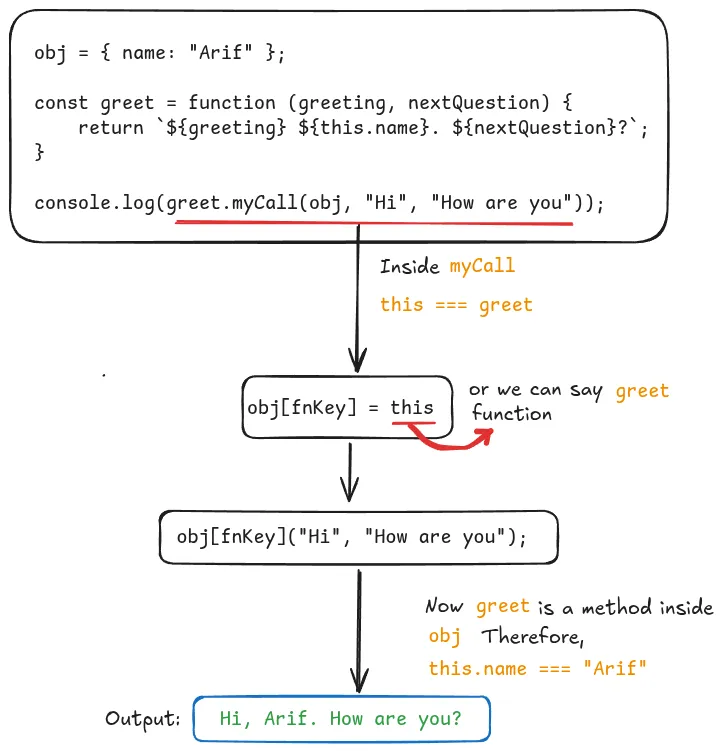
So the core trick behind this polyfill is:
Temporarily attach the function to the context object, call it as a method of that object so that
thispoints to the object, and then remove the temporary property.
Now polyfills for apply and bind will be much easier to understand because they use the same fundamental idea.
Polyfill of apply method
Easy path: using call method (call method must exists natively)
Do the reverse of what we did in for call. Take an array as argument and pass it with spread operator.
Function.prototype.myApply = function(objContext, args) {
  const result = this.call(objContext, ...(args ?? []));
  return result;
};
Tough path: writing it from scratch (without using call)
Similar to what we did when we wrote it for call.
Function.prototype.myApply = function (context, argsArray) {
  context = context ?? globalThis;
  const fnKey = Symbol("fn");
  context[fnKey] = this;

  const result = context[fnKey](...(argsArray ?? []));
  delete context[fnKey];
  return result;
};

function sum(a, b, c) {
  return this.base + a + b + c;
}
const ctx = { base: 10 };
const res = sum.myApply(ctx, [1, 2, 3]);
console.log(res); // 16
The only difference is: Arguments are passed as an array but we’ll have to use spread operator while passing the same argument
array further to sum.
Polyfill of bind method
bind function returns a new function. Now that new function might have some preset arguments already passed while binding
and remaining can be passed while calling the bound function.
We have to handle both arguments (in preset and remaining passed while calling the bound function) and also the this context.
This one is built on top of myApply polyfill that we wrote above. In easy path, we can use just inbuilt apply method
to achieve this. Let’s just see the tough path here.
Let’s do some QnA before we jump into the code:
- What
myBindshould return? A new function. - What should that new function do? It should call the original function with the provided context and arguments.
- Can we create a bound function without any preset arguments? Yes, we can. In that case, the bound function will just call the original function with the provided context and any arguments passed to it.
Function.prototype.myBind = function (context, ...presetArgs) {
  const originalFn = this;

  return function (...laterArgs) {
    // Access to context and presetArgs is available here because of closure
    return originalFn.myApply(context, [...presetArgs, ...laterArgs]);
  };
};

function intro(id, city) {
  return `${this.name} (${id}) from ${city}`;
}

const user = { name: "Arif" };

const introArif = intro.myBind(user, "sans__arif"); // preset id
console.log(introArif("India")); // "Arif (sans__arif) from India"
If you’ll revisit the closure article, you’ll see how we are able to access context and presetArgs inside the returned function.
This is because of closure. The returned function has access to the variables in the scope in which it was created, even after that scope has finished executing.
Now another doubt you may have is: Can we use myCall instead of myApply? Yes, we can.
But we have to use spread operator to pass the arguments array to myCall because myCall expects individual arguments, not an array.
Function.prototype.myBind = function (context, ...presetArgs) {
  const originalFn = this;

  return function (...laterArgs) {
    // Access to context and presetArgs is available here because of closure
    return originalFn.myCall(context, ...presetArgs, ...laterArgs);
  };
};
Are there any limitations of this polyfill? Yes, there are. Let’s see them:
Limitations
myBindis not fully spec-compliant. It works fine for most cases, but nativebind()also supports:- Using the bound function as a constructor (with
new), which is not handled in this polyfill. - Preserving the prototype chain of the original function, which is also not handled here.
- Using the bound function as a constructor (with
function Person (name) {
  this.name = name
}

const BoundPerson = Person.bind({ name: 'Odysseus', wife: 'Penelope' });
const p = new BoundPerson('Arif'); // using as constructor
console.log(p.wife); // undefined, as p is an instance of Person
// (i.e. Person { name: 'Arif' }), not the bound context

// If we use myBind instead of native bind, it will not work as expected because
// the bound function does not have the correct prototype chain.
// Implementing this behavior is complex and beyond the scope of this polyfill.-
null / undefinedcontext + strict mode cannot be perfectly emulated in a simple polyfill. We didcontext = context ?? globalThis;, but native behaviour is:- In non-strict mode,
nullorundefinedcontext is replaced with the global object. - In strict mode,
nullorundefinedcontext remains as is.
- In non-strict mode,
-
Primitive context values are not handled:
- Native
call,apply, andbindconvert primitivethisvalues (such as strings, numbers, and booleans) into their corresponding wrapper objects when the function executes in non-strict mode. - Our
myCallpolyfill does not handle this boxing explicitly. When we try to assign a property to a primitive usingcontext[fnKey] = this, it can throw aTypeErrorin strict mode. In non-strict mode, the assignment may fail silently, causing the subsequent function call to fail.
- Native
For example:
function showThis() {
  console.log(typeof this, this);
}

showThis.call(42);    // "object", [Number: 42] (non-strict mode)
showThis.myCall(42);  // May throw a TypeError (What we have wrote above will surely throw TypeError)
To handle this correctly, we can explicitly convert primitive values into objects using Object(context) before assigning the temporary property.
- The
contextobject must be mutable. If the context is a frozen object (created withObject.freeze()), the polyfill will fail when trying to assign the temporary property. Nativecall,apply, andbinddo not have this limitation.
I hope this was fun. While writing this article I also learned a lot about polyfills and how to implement them. I hope you also learned something new. If you have any questions, feel free to reach out to me on Twitter or LinkedIn. I will be happy to help you.